

Tested Minecraft Versions:
Neon
Languages Supported:
En
Donation Link:
https://streamlabs.com/neoncam

PlayerServers lets your players automatically start and run their own servers connected to your BungeeCord instance, where they have tons of control to create their own server. PlayerServers will allow you to define multiple template servers that your players can choose to create their own server from, and automatically connect it to your BungeeCord network. You can configure templates however you want, and can define as many as you want! Server creators will optionally be given OP, and can use intuitive GUIs to manage their server— OR you can disable creator OP and let them start a private minigame sever— OR almost anything else you can imagine!
PlayerServers will start the player's server when they join it, and shut it down after it has been empty for 90 seconds, saving your server's resources!
Many users have compared this to Mineplex's "Player Servers", or MineTime's "Empires". It wasn't really modeled after them, rather PlayerServers was simply built on the same basic idea: Servers that are automatically created and put under a player's control.
PlayerServers offers many customization options for you, the network owner to offer their own unique offering of servers for the players. They could be minigame servers, survival worlds, their own little city, a redstone flatworld, or whateveryou can come up with! Instead of just copying what other big servers do, PlayerServers gives you the tools to offer something better!
PlayerServers isn't just a powerful plugin, it is a platform for you to build off of and even for your players to build off of!
How it works »
The PlayerServers main plugin is installed on BungeeCord, where it will control creation, starting/stoppping, and modifying player's servers. The same PlayerServers.jar file should also be installed on your hub server (and any other existing servers you want people to join/create servers from) to support the GUIs, bukkit permissions fetching, and command forwarding (for BuyCraft, Skript, etc)
When a player creates a new server, files are copied from the template they select into a server folder just for that player. Templates are basically just individual server setups, with plugins, configs, spigot.jar, etc. Templates are created by you, and you can have multiple different templates. Servers are started up within a screen session automatically and bind to their own port, so for this reason PlayerServers requires it be hosted on a VPS or Dedicated Server that you have BungeeCord running on.
When the player starts a server, an entirely new server starts up and is added to BungeeCord, ready for the creator and/or other players to join. This is it's own server, with it's own server folder.
Features »
/psa slots command (1.11+) » View and set a current player's server slots. See commands wiki page for more details.
Add/remove memory on a player's server (1.11+) » instead of just setting the memory via the /psa maxmem and /psa startmem commands, you can now add/remove from the current value. See commands wiki page for more details.
Auto Server Purging (1.10+) » Servers can now be optionally purged a configured period after they expire, saving you space used from inactive players. Set them to purge in seconds to automatically delete servers right after they expire.
Fine-Grained Expiry Control (1.6+) » Set players expiry time in mins/hours/days/months. Also define a default expiry time per-template, and added a config option to reset expiry times whenever someone creates a server.
Test Server »
CakeMine.net:25665 (Notice, not the default port)
TestPlugins.com (@extended_clip 's server)
Screenshots »
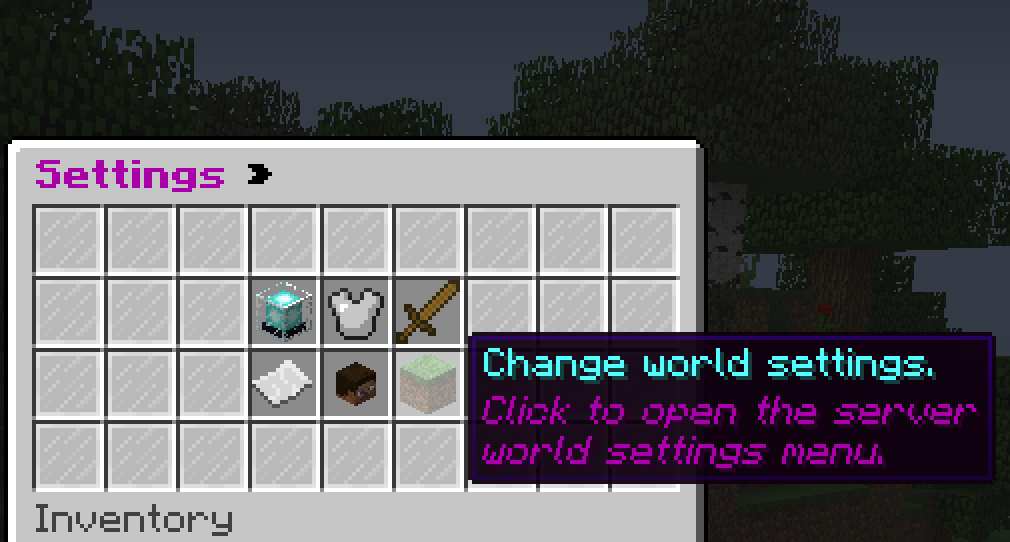
Player Server Main Settings GUI (usable by the server creator):
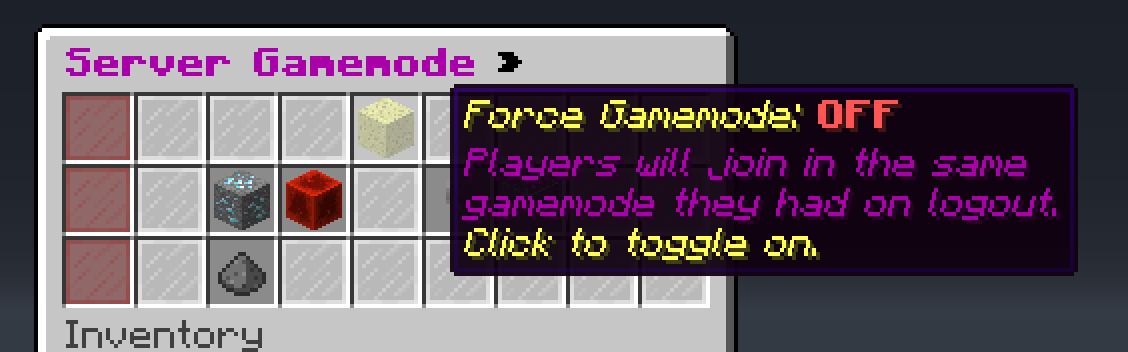
Server GameMode Settings GUI (usable by the server creator):
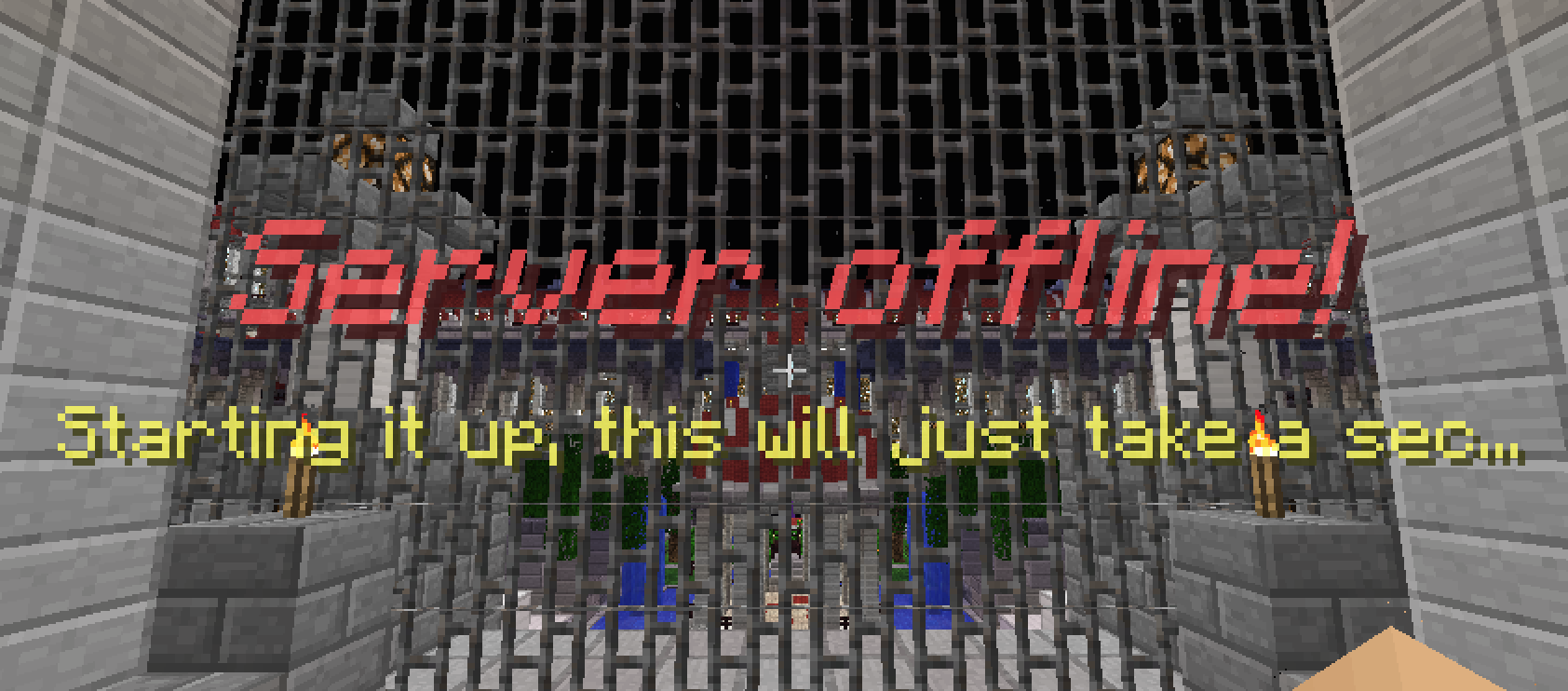
Optional Titles instead of chat messages:
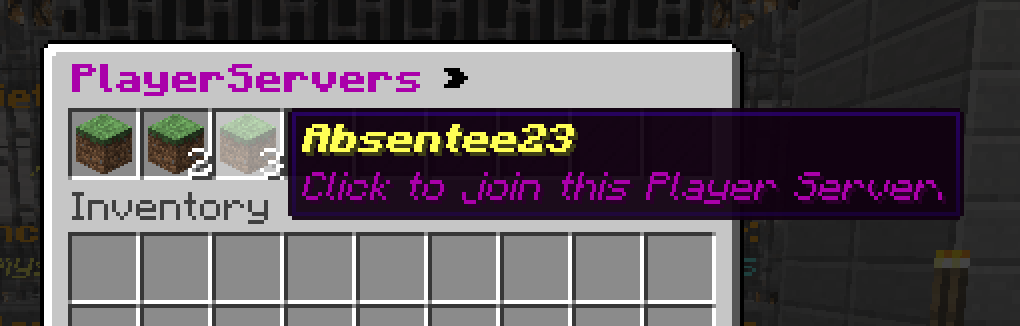
Online Server Join GUI (using /ps join):
World / Template Selection GUI
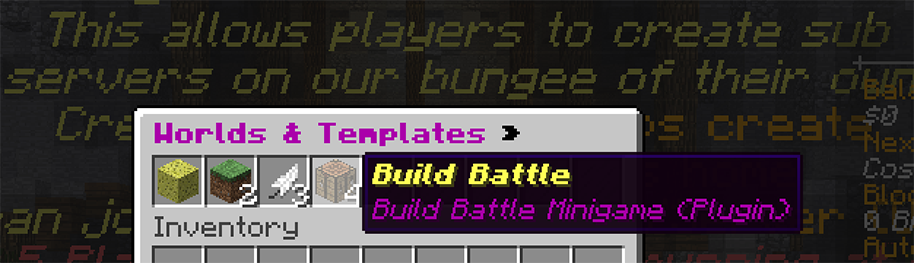
Server Creation Messages (editable prefix + messages.yml):
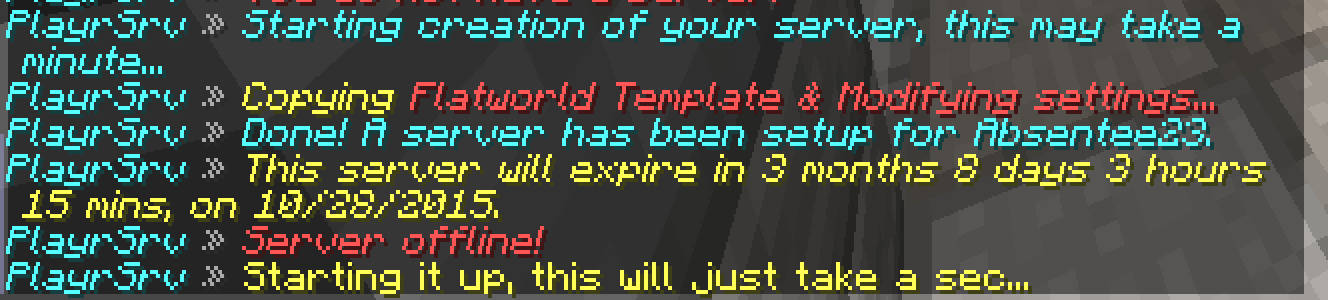
Requirements »
AddOn plugins modify & extend the functionality of PlayerServers through it's very powerful API.
Commands »
Permissions »
Frequently Asked Questions (FAQ) »
Issue Tracker »
If you have a feature suggestion, a bug to report, or just want to see my development activity (I use the issue tracker as a scratchpad for ideas as well), you can find the Issue Tracker here.
Planned Features »
You can see all the planned features (titled "Feature Ideas") here on the issue tracker.
Additional Services »
I offer additional services for setup, configuration, and customization:
It is my goal in my premium plugins to provide a premium experience. My plugins are made to be as robust and user friendly as possible, but support is always necessary which is why I always aim to provide the best! All support requests & bug reports are addressed in less than 24 hours. Sometimes less than an hour! (Just look at my other plugin reviews )
Negative OR Positive Reviews do not get problems fixed, posting them on the issue tracker or in the discussion threaddoes!
- 1.8
- 1.9
Neon
Languages Supported:
En
Donation Link:
https://streamlabs.com/neoncam

PlayerServers lets your players automatically start and run their own servers connected to your BungeeCord instance, where they have tons of control to create their own server. PlayerServers will allow you to define multiple template servers that your players can choose to create their own server from, and automatically connect it to your BungeeCord network. You can configure templates however you want, and can define as many as you want! Server creators will optionally be given OP, and can use intuitive GUIs to manage their server— OR you can disable creator OP and let them start a private minigame sever— OR almost anything else you can imagine!
PlayerServers will start the player's server when they join it, and shut it down after it has been empty for 90 seconds, saving your server's resources!
Many users have compared this to Mineplex's "Player Servers", or MineTime's "Empires". It wasn't really modeled after them, rather PlayerServers was simply built on the same basic idea: Servers that are automatically created and put under a player's control.
PlayerServers offers many customization options for you, the network owner to offer their own unique offering of servers for the players. They could be minigame servers, survival worlds, their own little city, a redstone flatworld, or whateveryou can come up with! Instead of just copying what other big servers do, PlayerServers gives you the tools to offer something better!
PlayerServers isn't just a powerful plugin, it is a platform for you to build off of and even for your players to build off of!
How it works »
The PlayerServers main plugin is installed on BungeeCord, where it will control creation, starting/stoppping, and modifying player's servers. The same PlayerServers.jar file should also be installed on your hub server (and any other existing servers you want people to join/create servers from) to support the GUIs, bukkit permissions fetching, and command forwarding (for BuyCraft, Skript, etc)
When a player creates a new server, files are copied from the template they select into a server folder just for that player. Templates are basically just individual server setups, with plugins, configs, spigot.jar, etc. Templates are created by you, and you can have multiple different templates. Servers are started up within a screen session automatically and bind to their own port, so for this reason PlayerServers requires it be hosted on a VPS or Dedicated Server that you have BungeeCord running on.
When the player starts a server, an entirely new server starts up and is added to BungeeCord, ready for the creator and/or other players to join. This is it's own server, with it's own server folder.
Features »
- Individual server per player.
- MultiTemplates: Create multiple templates that you can configure separately, which the player can select on creation.
- Configure different games, world types, plugin setups, and more, into separate templates that the player can select to create their server from.
- Set the template name, description, icon, and if the creator gets control in thePlayerServers.yml for each template
- Customize each template for different experiences!
- Players can have control of their server. The player is optionally OP'd when they login to their server.
- Servers startup on demand, and stop when inactive.
- Many customizable messages (in messages.yml)
- Customizable /playerserver command and message prefix. "Brand" your server offering.
- Highly configurable.
- Custom memory settings per-server (with a default set in config.yml)
- Optional player server expiration. A player will be unable to create or start a server if their time has expired, and servers can shut down when they expire as well.
- Configurable default time (defined in mins/hours/days/months) to be added on player's server creation.
- Easily add remove mins/hours/days/months from a player's time with a command.
- Servers can be purged (deleted) a configurable period after they expire.
- Player created servers are copied from customized templates created by you.
- You can create multiple templates that the player can select when creating a server.
- The template's plugin and spigot .jar files are symlink'ed automatically to player servers, so updating the template .jar will update player server .jars automatically(assuming the name is kept identical).
- Configs and other files will be copied, and can be customized per-server.
- Player Server settings GUI
- Allows players to manage and edit their servers without giving them config or console access.
- Let them manage server name, motd, difficulty, default gamemode, whitelist, world settings, mob settings, players, PvP settings, and more, all without any commands!
- World/Template selection GUI
- Use the same PlayerServers.jar on your network's existing spigot servers, and players can use an inventory GUI to learn about and select a template.
- Server Join Selector GUI
- Use the same PlayerServers.jar on your network's existing spigot servers, and players can use an inventory GUI to select running servers to join (if they have permission)
- On templates that allow OP for server creators, server creators can regain control (deOP all, and OP themselves) with one command if they OP a griefer.
- Define regex for blocked commands in the bungee config, and those commands will be automatically blocked on playerservers, even from commandblocks, commandcarts, and more.
- You, the network owner, can define names or UUIDs in the config to ALWAYS OP on players' servers, so you can set yourself to always be OP when you join a PlayerServer.
- Bukkit-side helper plugin built in for use with BuyCraft, Skript, etc. Use the SAME PlayerServers.jar on your Spigot servers to allow for PlayerServers GUIs, and forwarding commands from Bukkit to bungee.
/psa slots command (1.11+) » View and set a current player's server slots. See commands wiki page for more details.
Add/remove memory on a player's server (1.11+) » instead of just setting the memory via the /psa maxmem and /psa startmem commands, you can now add/remove from the current value. See commands wiki page for more details.
Auto Server Purging (1.10+) » Servers can now be optionally purged a configured period after they expire, saving you space used from inactive players. Set them to purge in seconds to automatically delete servers right after they expire.
Fine-Grained Expiry Control (1.6+) » Set players expiry time in mins/hours/days/months. Also define a default expiry time per-template, and added a config option to reset expiry times whenever someone creates a server.
Test Server »
CakeMine.net:25665 (Notice, not the default port)
TestPlugins.com (@extended_clip 's server)
Screenshots »
Player Server Main Settings GUI (usable by the server creator):

Server GameMode Settings GUI (usable by the server creator):

Optional Titles instead of chat messages:

Online Server Join GUI (using /ps join):

World / Template Selection GUI

Server Creation Messages (editable prefix + messages.yml):

Requirements »
- BungeeCord on a VPS or Dedicated Server running Linux.
- This plugin will NOT work on shared minecraft hosting.
- GNU screen installed.
AddOn plugins modify & extend the functionality of PlayerServers through it's very powerful API.
- PSPluginSelector » Allow creators to enable and disable specific plugin.

- Main settings are in Config.yml
- Configure messages in Messages.yml
- Templates' settings are set in their individual PlayerServers.yml
Commands »
Permissions »
Frequently Asked Questions (FAQ) »
Issue Tracker »
If you have a feature suggestion, a bug to report, or just want to see my development activity (I use the issue tracker as a scratchpad for ideas as well), you can find the Issue Tracker here.
Planned Features »
You can see all the planned features (titled "Feature Ideas") here on the issue tracker.
Additional Services »
I offer additional services for setup, configuration, and customization:
- Setup & Configuration »
Price: $5- Includes: Me SSH/FTPing in to install, setup, and includes testing of PlayerServers on your server and customization of PlayerServers settings to your spec.
- Custom PlayerServers AddOn plugins »
Prices: Small: $5-10 | Large: Contact me.- Includes a custom add on for the plugin, at the price agreed upon after we talk about what you need.
- 89.203.250.197:25567 (Production server, premium feature)
- Quite a few buyers, but I'll only put server names here by request! Post in the thread or PM me.
- Purchase of this plugin entitles you to use it on ONE (1) BungeeCord instance.
- This means it may be used on ALL servers under a SINGLE (1) BungeeCord Proxy.
- If you would like to use this on multiple BungeeCord instances, contact me (Absentee23) on the spigot forums.
- You MAY decompile & modify this plugin to fit your PERSONAL use, provided you understand modified versions are UNSUPPORTED and cannot be redistributed.
- You WILL NOT redistribute the original or any modified version of this plugin.
- I'm trying to be very fair with these terms, so be fair to me and don't pirate this!
It is my goal in my premium plugins to provide a premium experience. My plugins are made to be as robust and user friendly as possible, but support is always necessary which is why I always aim to provide the best! All support requests & bug reports are addressed in less than 24 hours. Sometimes less than an hour! (Just look at my other plugin reviews )
Negative OR Positive Reviews do not get problems fixed, posting them on the issue tracker or in the discussion threaddoes!
![EpicWorldGenerator MODERN [1.21.11 / 26.1.2 / 26.2] Now with Multiverse Support! (EWG)](/data/resource_icons/0/839.jpg?1782116339)


